# Google Bigquery

Introduction

Google Cloud's Blockchain Analytics offers indexed blockchain data made available through [BigQuery](https://cloud.google.com/bigquery/docs) for easy analysis through SQL.

[Visit the Google Web3 portal](https://cloud.google.com/application/web3/discover) to retrieve all available datasets.

Blockchain Analytics offers you access to reliable data without the overhead of operating nodes or developing and maintaining an indexer. You can now query the full history of blocks, transactions, logs and receipts for Cronos.

By leveraging datasets in BigQuery, you can access blockchain data as easily as your internal data. By joining chain data with application data, you can get a complete picture of your users and your business.

### How are these datasets different from the existing public dataset? <a href="#how_are_these_datasets_different_from_the_existing_public_dataset" id="how_are_these_datasets_different_from_the_existing_public_dataset"></a>

Like the existing public blockchain datasets, customers are not charged for storage of the data, only for querying the data based on [BigQuery pricing](https://cloud.google.com/bigquery/pricing).

### Quickstart

1. [Go to Cronos dataset](https://console.cloud.google.com/marketplace/product/bigquery-public-data/blockchain-analytics-cronos-mainnet-us?_ga=2.57494312.344001667.1705466080-1066618470.1698651784&_gac=1.157920072.1705465933.CjwKCAiA75itBhA6EiwAkho9e8myknN2EhHAyk2F9H-eciNzXDhip1AUtZ6GiBaCllmrfHni5MMy3BoCKroQAvD_BwE) and click on one of the [samples](https://console.cloud.google.com/bigquery?sq=650023896125:07dd7c4b273c45639c8f38983b9b7de0).
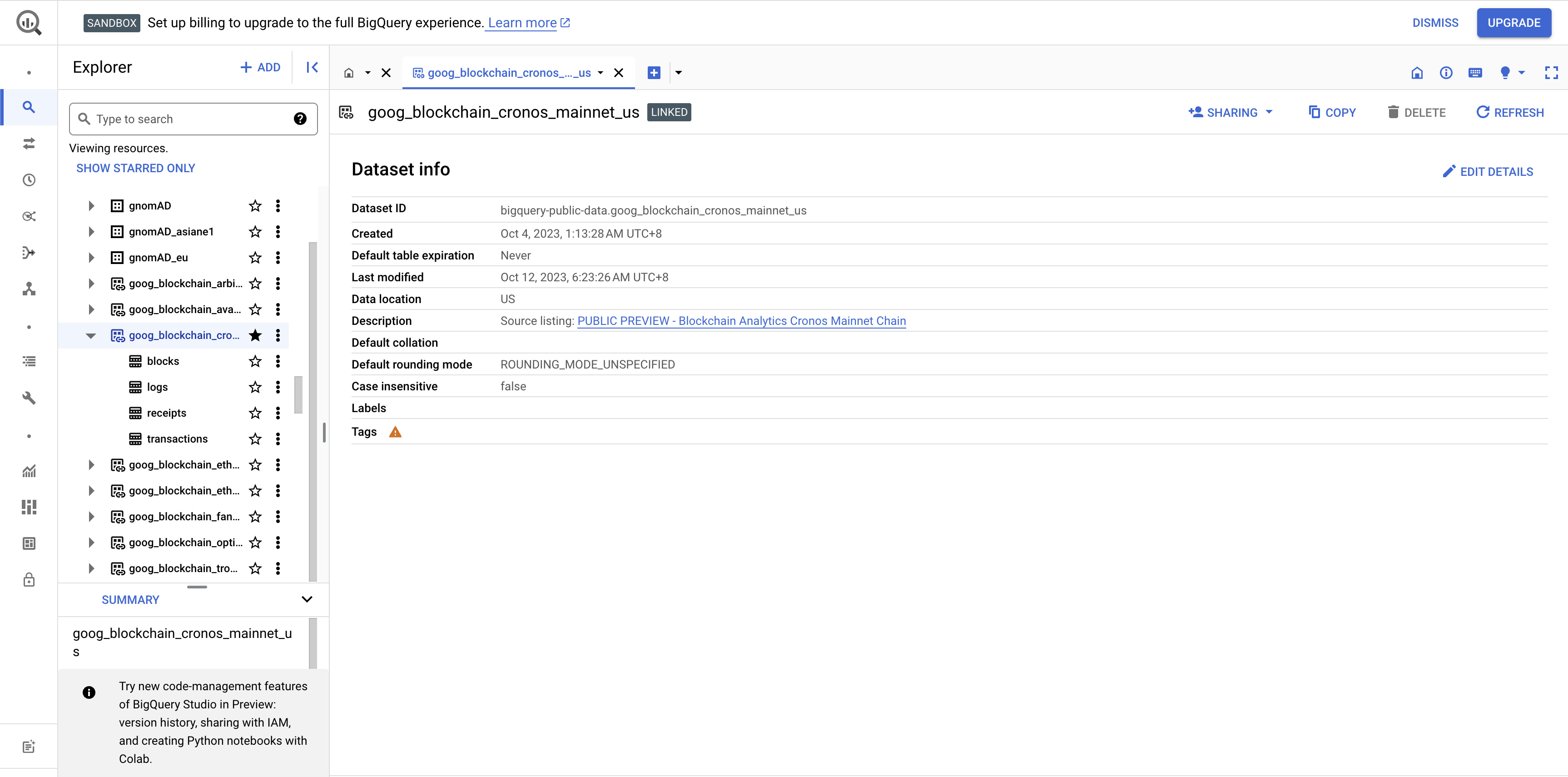
2. You will get to the console and see the Cronos dataset on the left in the explorer

<figure><img src="https://1786307500-files.gitbook.io/~/files/v0/b/gitbook-x-prod.appspot.com/o/spaces%2FqXsIo4b4WtOTfICyOIxa%2Fuploads%2Fgit-blob-ab45851b3a1a2c853b252941fd2a6c915eaffd15%2FScreenshot%202024-01-17%20at%2012.42.47%20PM.png?alt=media" alt=""><figcaption></figcaption></figure>

{% hint style="warning" %}
**Please note**\
BigQuery charges are based on the amount of data processed by your queries, so running the query may incur charges to your account. You can find the consumption estimate in the top right corner similar to the warning of "This query will process 65.73 MB when run."
{% endhint %}

3. If you see on the sample you should get the BigQuery SQL code to query:\
   [Which wallets had the most number of interactions with the Wrapped Cronos contract in the past 30 days?](https://console.cloud.google.com/bigquery?sq=650023896125:07dd7c4b273c45639c8f38983b9b7de0)

   Let's click the big `RUN` button.\
   (To save costs, replace the existing query with the one below, using a "1 day" interval instead of "30 days" in the BigQuery console).\
   \
   To start developing your own BigQuery SQL code, we refer to the following [syntax](https://cloud.google.com/bigquery/docs/reference/standard-sql/query-syntax).\
   For the Cronos data schema we refer to the [Google Cloud Cronos schema](https://cloud.google.com/blockchain-analytics/docs/schema#cronos_mainnet).

```sql
SELECT
 t.from_address AS address,
 CONCAT("https://cronoscan.com/address/", t.from_address) AS cronoscan_link,
 COUNT(t.from_address) AS num_transactions
FROM
 `bigquery-public-data.goog_blockchain_cronos_mainnet_us.transactions` AS t
INNER JOIN
 bigquery-public-data.goog_blockchain_cronos_mainnet_us.blocks AS b
ON
 b.block_hash = t.block_hash
WHERE
 t.to_address = LOWER("0x5C7F8A570d578ED84E63fdFA7b1eE72dEae1AE23") -- Wrapped CRO
AND
 b.block_timestamp > (CURRENT_TIMESTAMP() - INTERVAL 1 HOUR)
AND
 t.block_timestamp > (CURRENT_TIMESTAMP() - INTERVAL 1 HOUR)
GROUP BY
 t.from_address
ORDER BY
 COUNT(t.from_address) DESC
;
```

4. We can now query the results in the results tab below, further explore by exporting the results or visualizing in another tool such as Google sheets or Looker.

| Row | address                                    | cronoscan\_link                                                            | num\_transactions |
| --- | ------------------------------------------ | -------------------------------------------------------------------------- | ----------------- |
| 1   | 0x3270c9a4558774cc8f2a19708edc190366028b96 | <https://cronoscan.com/address/0x3270c9a4558774cc8f2a19708edc190366028b96> | 1                 |
| 2   | 0xbeaf1c7fed452be2dcfd2a8fe1fcd74b241acfc7 | <https://cronoscan.com/address/0x693fb96fdda3c382fde7f43a622209c3dd028b98> | 1                 |
| 3   | 0xddb162b31f562f1be0fa585d3ca6a55786e59af3 | <https://cronoscan.com/address/0x6614d26064d762922c7bc7a00337713d5169ae7c> | 1                 |

### Example queries

#### 1. Latest indexed block

```sql
SELECT
  MIN(block_number) AS `First block`,
  MAX(block_number) AS `Newest block`,
  COUNT(1) AS `Total number of blocks`
FROM
  `bigquery-public-data.goog_blockchain_cronos_mainnet_us.blocks` AS t
```

| Row | First block | Newest block | Total number of blocks |   |
| --- | ----------- | ------------ | ---------------------- | - |
| 1   | 1           | 12134627     | 12134627               |   |

#### 2. Daily **transactions in the last 10 days**

```sql
SELECT
  DATE(block_timestamp) AS date,
  COUNT(*) AS num_transactions
FROM
  `bigquery-public-data.goog_blockchain_cronos_mainnet_us.transactions`
WHERE
  block_timestamp >= TIMESTAMP_SUB(CURRENT_TIMESTAMP(), INTERVAL 10 DAY)
GROUP BY
  1
ORDER BY
  1 DESC;
```

<table><thead><tr><th width="188.33333333333331">Row</th><th width="260">date</th><th>num_transactions</th></tr></thead><tbody><tr><td>1</td><td>2024-01-18</td><td>10250</td></tr><tr><td>2</td><td>2024-01-17</td><td>47747</td></tr><tr><td>3</td><td>2024-01-16</td><td>49717</td></tr><tr><td>4</td><td>2024-01-15</td><td>47099</td></tr><tr><td>5</td><td>2024-01-14</td><td>47051</td></tr></tbody></table>

#### 3. View the blocks with largest CRO value transfer in the past hour

```sql
SELECT block_hash, SUM(value.bignumeric_value / 1000000000000000000) value_total
FROM `bigquery-public-data.goog_blockchain_cronos_mainnet_us.transactions` AS t
 JOIN `bigquery-public-data.goog_blockchain_cronos_mainnet_us.receipts` AS r USING (block_hash, transaction_hash)
WHERE status = 1
AND
 t.block_timestamp > (CURRENT_TIMESTAMP() - INTERVAL 1 HOUR)
AND
 r.block_timestamp > (CURRENT_TIMESTAMP() - INTERVAL 1 HOUR)
GROUP BY block_hash
ORDER BY value_total DESC
LIMIT 5
```

<table data-header-hidden><thead><tr><th width="93.33333333333331"></th><th width="366"></th><th></th></tr></thead><tbody><tr><td><strong>Row</strong></td><td><strong>block_hash</strong></td><td><strong>value_total</strong></td></tr><tr><td>1</td><td>0x7cac0bbf3909902a8670f962fbc9721391178850a2672d82b75c5a79b332a4f8</td><td>36836.840925000000000001</td></tr><tr><td>2</td><td>0xb53bd2c1a1d136e9b4dda4af47c488d278a0ee450adecd991cf13b187ce17a93</td><td>36729</td></tr><tr><td>3</td><td>0x28e0d8c31625ca43b565f1202b91e6cb20b709e25bea65185dcda7a3d176957d</td><td>33359.85627</td></tr><tr><td>4</td><td>0xfe8e732779101854cfaeed2404f7b53d3b64879069b5d8e8372f64d1cfe4a47f</td><td>22577.325273500000000015</td></tr><tr><td>5</td><td>0xd0b81821a57dc939dce80b29e9642f4a39e4bd2d346b5943a2532e69f191de57</td><td>22231.469422733370862931</td></tr></tbody></table>

#### 4. Top 10 wallets by number of transactions in the last hour

```sql
SELECT
 from_address,
 COUNT(*) AS num_transactions
FROM `bigquery-public-data.goog_blockchain_cronos_mainnet_us.transactions` as t
WHERE
t.block_timestamp > (CURRENT_TIMESTAMP() - INTERVAL 1 HOUR)
GROUP BY from_address
ORDER BY num_transactions DESC
LIMIT 10;
```

<table><thead><tr><th width="85.33333333333331">Row</th><th width="447">from_address</th><th>num_transactions</th></tr></thead><tbody><tr><td>1</td><td>0x25aa97464f38a1506a16160bbc03cfc6dd863da3</td><td>211</td></tr><tr><td>2</td><td>0x227f6757289a86c13eee2e91c2e6eb03f2ed11a6</td><td>136</td></tr><tr><td>3</td><td>0x95d49a8a2d69b2a2de4a00655d05ee39f9c41108</td><td>134</td></tr><tr><td>4</td><td>0x15d190dd8a1ed39cf5b790e2ffed1f365e9c865b</td><td>116</td></tr><tr><td>5</td><td>0xc9219731adfa70645be14cd5d30507266f2092c5</td><td>80</td></tr><tr><td>6</td><td>0x6614d26064d762922c7bc7a00337713d5169ae7c</td><td>65</td></tr><tr><td>7</td><td>0x34cfa46732692ab062f0453036cd5a4f5b771473</td><td>59</td></tr><tr><td>8</td><td>0x693fb96fdda3c382fde7f43a622209c3dd028b98</td><td>50</td></tr><tr><td>9</td><td>0x71f0cdb17454ad7eeb7e26242292fe0e0189645a</td><td>50</td></tr><tr><td>10</td><td>0x518a9d51ba8841046859a7722e75f92ffdadd0c4</td><td>37</td></tr></tbody></table>

#### 5. All USDT activity in the past hour

```sql
-- UDF for easier string manipulation.
CREATE TEMP FUNCTION ParseSubStr(hexStr STRING, startIndex INT64, endIndex INT64)
RETURNS STRING
LANGUAGE js
AS r"""
 if (hexStr.length < 1) {
   return hexStr;
 }
 return hexStr.substring(startIndex, endIndex);
""";
-- UDF to convert hex to decimal.
CREATE TEMP FUNCTION HexToDecimal(hexStr STRING)
RETURNS INT64
LANGUAGE js
AS r"""
 return parseInt(hexStr, 16);
""";

SELECT
 t.transaction_hash,
 t.from_address AS from_address,
 CONCAT("0x", ParseSubStr(l.topics[OFFSET(2)], 26, LENGTH(l.topics[OFFSET(2)]))) AS to_address,
 (HexToDecimal(l.data) / 1000000) AS usdt_transfer_amount
FROM
 `bigquery-public-data.goog_blockchain_cronos_mainnet_us.transactions` AS t
INNER JOIN
 `bigquery-public-data.goog_blockchain_cronos_mainnet_us.logs` AS l
ON
 l.transaction_hash = t.transaction_hash
WHERE
 t.to_address = LOWER("0x66e428c3f67a68878562e79a0234c1f83c208770") -- USDT
AND
 t.block_timestamp >= (CURRENT_TIMESTAMP() - INTERVAL 1 HOUR) 
AND
 l.block_timestamp >= (CURRENT_TIMESTAMP() - INTERVAL 1 HOUR) 
AND
 ARRAY_LENGTH(l.topics) > 0
AND
 -- Transfer(address indexed src, address indexed dst, uint wad)
 l.topics[OFFSET(0)] = LOWER("0xddf252ad1be2c89b69c2b068fc378daa952ba7f163c4a11628f55a4df523b3ef") -- Transfer
;
```

<table data-header-hidden><thead><tr><th width="87"></th><th width="262"></th><th width="231"></th><th width="233"></th><th></th></tr></thead><tbody><tr><td><strong>Row</strong></td><td><strong>transaction_hash</strong></td><td><strong>from_address</strong></td><td><strong>to_address</strong></td><td><strong>usdt_transfer_amount</strong></td></tr><tr><td>1</td><td>0xa3b78f79dee6970f3abc763b52f24a6d46aeba3e2370943f8eb2d68ff00d788a</td><td>0xc9219731adfa70645be14cd5d30507266f2092c5</td><td>0x539b85a6853e8740cd918009197c799d205787eb</td><td>309.82</td></tr><tr><td>2</td><td>0xc2abd163669a703ee850e432ac7c1a744b63bb1ff8e9b4cdee3ec2d95768fc75</td><td>0xc9219731adfa70645be14cd5d30507266f2092c5</td><td>0xc041126c1d07b72ee0f366e1fca339b4fed537cb</td><td>9.38</td></tr><tr><td>3</td><td>0x214cdef8263b4f8cc517d09673c126375c682b9b83d55c7ad889055c57533390</td><td>0xc9219731adfa70645be14cd5d30507266f2092c5</td><td>0xfca38e2882d8a549c660ccb17a8fe0463fab060e</td><td>11.82</td></tr><tr><td>4</td><td>0x40e24cc93abc746aa7c96482144772421412b9a733210644bab6ff6290996a1e</td><td>0xc9219731adfa70645be14cd5d30507266f2092c5</td><td>0x67b652172633b451a826aac6da7ed63693133fd2</td><td>11.26</td></tr><tr><td>5</td><td>0xb211dcb87ec8bbb115a4c6eae6c5a8861e04557b8b502e5a5858e70ae512183b</td><td>0x539b85a6853e8740cd918009197c799d205787eb</td><td>0x8995909dc0960fc9c75b6031d683124a4016825b</td><td>309.82</td></tr></tbody></table>

#### 6. For Dapps - Count the total number of unique transactions and users interaction with a specific smart contract on a given day

```sql
SELECT
 COUNT(DISTINCT transaction_hash) AS total_transactions,
 COUNT(DISTINCT from_address) AS unique_users,date(block_Timestamp) as date
FROM
`bigquery-public-data.goog_blockchain_cronos_mainnet_us.transactions`
WHERE
 to_address = '0x9fae23a2700feecd5b93e43fdbc03c76aa7c08a6'
 AND block_timestamp BETWEEN TIMESTAMP('2023-01-01 00:00:00') AND TIMESTAMP('2023-01-02 00:00:00')
GROUP BY
date
```

<table data-header-hidden><thead><tr><th width="146">Row</th><th></th><th></th><th></th></tr></thead><tbody><tr><td><strong>Row</strong></td><td><strong>total_transactions</strong></td><td><strong>unique_users</strong></td><td><strong>date</strong></td></tr><tr><td>1</td><td>288</td><td>131</td><td>2023-01-01</td></tr></tbody></table>

#### 7. \[DApp] Top 5 addresses with the highest number of transactions sent to the contract at a specific contract within the specified date range

```sql
SELECT
 from_address,
 COUNT(transaction_hash) AS transaction_count,
FROM
 `bigquery-public-data.goog_blockchain_cronos_mainnet_us.transactions`
WHERE
 to_address = '0x9fae23a2700feecd5b93e43fdbc03c76aa7c08a6'
 AND block_timestamp BETWEEN TIMESTAMP('2024-05-01 00:00:00 UTC') AND TIMESTAMP('2024-07-31 23:59:59 UTC')
GROUP BY
 from_address
ORDER BY
 transaction_count DESC
LIMIT 5
```

<table data-header-hidden><thead><tr><th width="137"></th><th width="417"></th><th></th></tr></thead><tbody><tr><td><strong>Row</strong></td><td><strong>from_address</strong></td><td><strong>transaction_count</strong></td></tr><tr><td>1</td><td>0x8c0ec5772bd92d55edd1325d022ec07e54ae1b0e</td><td>3515</td></tr><tr><td>2</td><td>0x849c34e2bcd65a861dfaefe415aafb2826c46b96</td><td>224</td></tr><tr><td>3</td><td>0xc9219731adfa70645be14cd5d30507266f2092c5</td><td>129</td></tr><tr><td>4</td><td>0xfe5b12a84019dcd8178a4c684885a8e685bef238</td><td>72</td></tr><tr><td>5</td><td>0x254b5fed7b453831e89e566a2e02678636e9f010</td><td>46</td></tr></tbody></table>
